
What an invoice actually needs
Invoices look complicated and aren't. A finished invoice is a piece of paper (or a PDF, or an HTML email) with about ten things on it.
- Your business name and address.
- Your client's name and billing address.
- An invoice number that's unique to your books.
- The date the invoice was issued.
- The due date.
- An itemized list of what you did, with quantities and rates.
- The subtotal.
- Sales tax if it applies.
- The total amount due.
- How the client pays you, and any payment terms.
That's it. Anything beyond those ten things is either window dressing or a feature your invoicing software is selling you. Some of those features are genuinely useful: a payment link on the email saves you a week of follow-ups. Most aren't.
When a Word template stops working
Most people start invoicing in Word, Pages, or a Google Doc. That's fine. You can run a real business that way for a long time.
The signs it's no longer working:
- You can't remember which clients have paid you and which haven't.
- You're chasing the same late payment for the third time and you've run out of polite ways to phrase the email.
- You're emailing estimates back and forth and can't tell which ones the client actually approved.
- You wrote the wrong invoice number twice in a row and didn't notice until your accountant asked.
- You added a new client and realized you'd never updated the template.
When two or three of those are true, software starts paying for itself. Until then, the time you'd spend setting it up is better spent doing the work.
The kinds of invoicing software (and which one you want)
Almost every tool you'll find falls into one of five buckets. The difference between them is what they're trying to be.
1. Full bookkeeping suites: QuickBooks, Xero
These are accounting platforms that happen to send invoices. Chart of accounts, double-entry bookkeeping, bank reconciliation, payroll, inventory. You'll pay $35 to $235 a month, depending on plan and add-ons. If your accountant runs on QuickBooks and won't budge, get QuickBooks. If you're a one-person shop with twelve clients, you're paying for a whole accounting department you'll never use.
2. Broader freelance suites: FreshBooks, Bonsai
Built for freelancers and consultants who want a wider business toolset alongside billing. Pricing starts around $17 to $25 a month and climbs as you add clients or users. The toolsets are good. The pricing is the catch: FreshBooks' entry plan caps you at a handful of billable clients before forcing an upgrade.
3. Free with limits: Wave, Zoho Invoice
The basic plan is free or close to it. Wave makes money on payment processing fees, so the card rate is a hair higher than going direct to Stripe. Zoho's free plan limits users and customers and tries to upsell you into the wider Zoho suite. Both are real options if you only need to send a couple of invoices a month and don't bill in stages.
4. Payment-processor invoicing: Stripe Invoicing, Square Invoices, PayPal
Invoicing built into the payment provider. Stripe Invoicing is good and sneaky-cheap (you pay a small fee per paid invoice on top of normal processing). Square's invoices are free but the payment fees are higher when paid via the invoice link than at a card reader. These tools work, but they treat invoicing as a feature, not the product. There's no way for a client to accept an estimate online, no deposit and progress billing tracked against an estimate, and only basic recurring.
5. Focused estimate-to-invoice tools: PayPolka, Joist
One job: get the work estimated, accepted, invoiced, and paid. PayPolka is a flat monthly price with estimates clients accept online, deposit/progress/final invoicing tracked against the estimate, recurring invoices, and Stripe payments through your own account. There are no per-client limits or per-seat upcharges, and no double-entry bookkeeping to wade through. Joist covers similar ground for the trades with extras like material catalogs and homeowner financing. This is the right bucket for a service business that lives in estimates and invoices and doesn't want an accounting platform.
Comparison: PayPolka vs. the rest
Pricing and plans change constantly. Treat the table as a starting point, not gospel. As of June 11, 2026:
| Tool | Starting price (approx.) | Pricing model | Paid via your own Stripe | Deposit & progress billing |
|---|---|---|---|---|
| PayPolka | $5/mo beta, $15/mo standard | Flat, no client cap | Yes | Yes, tracked to the estimate |
| Joist | Free + paid tiers | Tiered | No (in-app processing) | Deposits |
| FreshBooks Lite | ~$19/mo | Tiered, client cap | No (built-in payments) | Deposits / retainers |
| Square Invoices | Free + paid plan | Free + add-ons | No (Square only) | Deposits |
| Wave | Free / paid tier | Free + processing | No (Wave Payments) | No |
| Stripe Invoicing | Fee per paid invoice | Usage-based | Yes (it is Stripe) | No |
Figures above are best-effort and change without notice. Always check the provider's current pricing and feature pages before you commit.
How to pick
Short version, organized by what your situation actually is.
- You have an accountant who lives in QuickBooks. Use QuickBooks. The accountant integration matters more than the price.
- You want full bookkeeping, payroll, and the works. QuickBooks or Xero. PayPolka isn't trying to do those.
- You send a couple of invoices a month and revenue is small. Wave or Stripe Invoicing. The free tier is good enough.
- You live in estimates and invoices and want to bill deposits and progress payments at a flat price, paid through your own Stripe account, with no client cap. PayPolka.
- You're in the trades and need material catalogs or homeowner financing built in. Joist does more there. PayPolka is simpler and cheaper.
From estimate to deposit, progress, and final invoice
For most service work, the bill doesn't arrive all at once. You quote the job, the client approves it, you take a deposit to start, invoice along the way, and settle the balance at the end. The tools that only make flat invoices leave you doing that math by hand. Here's the workflow PayPolka is built around:
- Send the estimate. The client opens a public link and accepts or declines online with a typed signature. If you publish terms, acceptance acknowledges them.
- Bill a deposit. Charge a percentage or fixed amount up front so you're not funding the job out of pocket. The deposit is tracked against the estimate.
- Invoice progress. As the work moves, bill progress payments against the remaining estimate balance.
- Send the final balance. One click bills whatever is left, so the totals always match the estimate.
You can also skip the stages and bill a single full invoice from the estimate. The point is that the choice is yours, and the numbers stay consistent.
How to send a professional invoice
The mechanics are the same regardless of what you use. The version that works:
- Number it. Sequentially. Invoice 0001, 0002, 0003. Or year-prefixed: 2026-001. Pick a system and stick to it.
- Itemize the work. One line per task or deliverable. Include quantity (hours, units) and rate. Vague invoices get questioned. Itemized ones get paid.
- State the payment terms clearly. Net 14. Due on receipt. Whatever you've agreed. Put it on the invoice in plain text.
- Make payment one click. A payment link is the difference between getting paid in three days and getting paid in three weeks. We aren't biased about this. It's just true.
- Keep a copy. Your accountant will need it. Your future self will need it.
Accepting payment: cards, ACH, Cash App Pay, cash/check
Each option has tradeoffs. For most US-based small businesses, offering a few of them is the right move. Let the client pick.
- Credit and debit cards. Fast (same-day balance), more expensive (around 2.9% + $0.30 per charge through Stripe). Good for clients who want speed and don't mind the fee.
- ACH. Cheap (0.8%, capped at $5 per transaction), slower (a few business days to clear). The right default for invoices over a few hundred dollars.
- Cash App Pay. Useful for clients who already pay that way. Runs through Stripe like the card and ACH options.
- Cash or check. Record it in PayPolka when the funds arrive. No processor fees. The public invoice shows your payment instructions, and the client can flag that they've sent payment.
The percentages above are Stripe's published rates and they change. Confirm at stripe.com/pricing. PayPolka doesn't add a markup, and you can optionally pass the processing fee through to the client.
When clients pay late
About a quarter of small business invoices are paid late. Most of the time it's an oversight. Sometimes it's worse than that. The response should escalate slowly.
Day after the due date: nothing yet. People are busy. PayPolka can send a soft auto-reminder. So can a calendar entry to write one yourself.
Three days late: a polite reminder. "Hi, just following up on invoice #0123, sent on the 5th. Let me know if there's anything you need from me to process it." Don't apologize for sending it.
Two weeks late: a more direct reminder, plus a phone call if you have a number. A late fee, if you set one, also kicks in here. Most cases resolve at this stage.
Thirty days late: ask if there's a problem. Sometimes there is. A payment plan or a partial payment is better than a write-off.
Sixty days late: small claims court is on the table for invoices over a few hundred dollars. So is firing the client. Late payers tend to keep being late payers.
Recurring invoices
The least-glamorous feature in invoicing software, and the one that saves you the most time. If you have a retainer client, a monthly maintenance fee, or any predictable engagement that bills on a schedule, set it up once and stop re-typing it.
One honest note on how this works in PayPolka: a recurring schedule generates a draft invoice on each cycle for you to review and send. It doesn't send on its own and it doesn't auto-charge a card. That's deliberate. The rules of thumb:
- Bill on the same day each month so your client knows when to expect it.
- Don't auto-charge cards without explicit consent. A surprise card charge is how you lose clients.
- Send the invoice a few days before the work starts, not after, if it's a retainer.
- Review your recurring schedules every six months. Old retainers slip through.
Sales tax and accounting basics
A short list. None of this is tax advice. Talk to a real accountant before April.
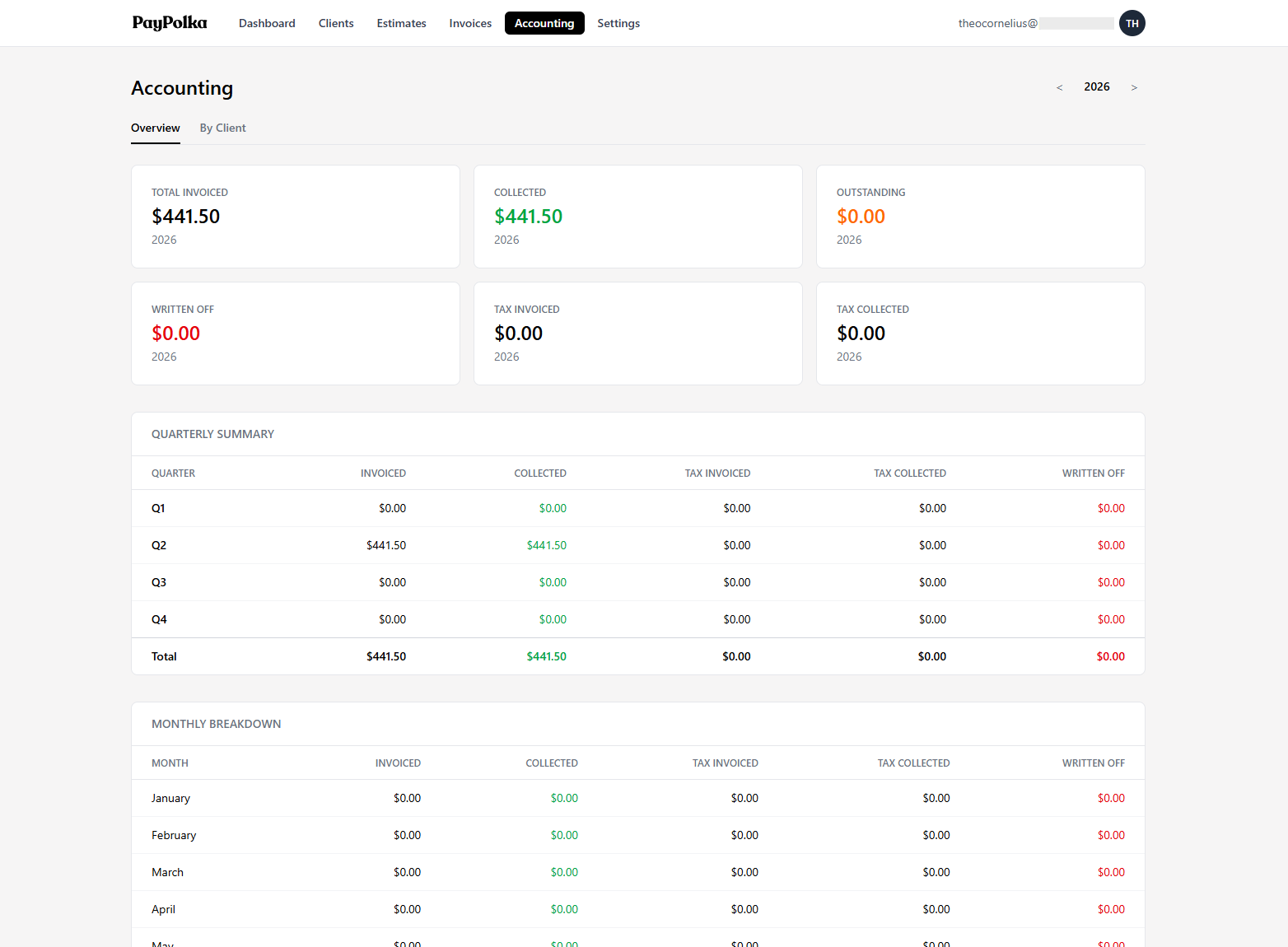
- Track income by client. Some clients will issue you a 1099. Most won't. You owe taxes either way. Knowing which client paid you what means the year-end numbers add up without a spreadsheet archaeology dig. PayPolka's Accounting view breaks down invoiced and collected by client.
- Watch your sales tax. If you charge sales tax, keep track of how much you've invoiced and how much you've collected. PayPolka summarizes sales tax invoiced and tax collected so the numbers are there when you file. It does not file for you or tell you what you owe. That's between you and your accountant.
- Pay quarterly estimates. If you owe more than $1,000 in federal tax for the year, the IRS expects payments four times a year (April, June, September, January). A surprise April tax bill is painful in a way you don't forget.
- Keep paid invoices for seven years. That's the IRS audit window. PDF copies are fine.
The official IRS guidance for small business owners is at irs.gov/businesses.
About PayPolka
PayPolka is paid estimating and invoicing software for small US service businesses: contractors and trades, freelancers, consultants, and small studios. We built it because the existing options were either bloated bookkeeping platforms with $30-a-month price tags, or free tools that made up the cost on payment fees and feature gates. We wanted one flat price, no client caps, and a tool that does the estimate-to-payment workflow well.
What's in:
- Estimates clients accept or decline online with a typed signature, plus attached proposal files and acknowledged terms.
- Deposit, progress, and final invoicing from an accepted estimate, all tracked against it.
- Manual and recurring invoices, with branded PDF invoices and receipts.
- Stripe payments (card, ACH, and Cash App Pay) through your own Stripe account, plus cash and check tracking. No markup on fees.
- Client payment portal, payment reminders, and late fees.
- Accounting summaries: invoiced, collected, and outstanding by month, quarter, and client, plus sales tax invoiced and collected.
- Up to three users on one account.
What's not:
- Double-entry bookkeeping or a chart of accounts. Use QuickBooks for that.
- Payroll.
- Inventory management.
- Multi-currency or international billing. PayPolka is US-only, USD-only.
$5 a month during beta. If you sign up during beta, you keep that $5 rate for as long as you stay subscribed; it never rises to the $15 standard rate, which only applies to accounts created after beta. That's the whole pricing page. See pricing or start for $5/month.
FAQ
What information has to be on an invoice?
At minimum: your business name and address, the client's name and address, an invoice number, the date it was issued, the due date, an itemized list of what you did with quantities and rates, the subtotal, any sales tax, the total, and how the client should pay. If you charge sales tax, your tax registration number goes on too. When in doubt, ask your accountant.
How do I send an invoice with a payment link?
Inside PayPolka: create the invoice (from scratch or from an accepted estimate), add the line items, hit send. The email that goes to your client has a payment link that opens a Stripe-powered checkout. Card payments hit your Stripe balance the same day. ACH takes a few business days to clear.
Can I accept ACH or bank transfers through PayPolka?
Yes. ACH, credit and debit cards, and Cash App Pay run through Stripe, and you can record cash or check payments yourself. ACH is the cheapest online option for US clients, since the processing fee is a small flat charge instead of a percentage of the invoice.
What's the difference between an invoice and an estimate?
An estimate is a price you're proposing before the work happens. An invoice is a bill for work already done (or for a defined deliverable). Estimates aren't legally collectible; invoices are. Some businesses use "quote" or "bid" interchangeably with estimate; they're effectively the same. In PayPolka, a client accepts an estimate online with a typed signature, and you bill against it.
Can I turn an accepted estimate into an invoice?
Yes, that's the core of PayPolka. Once a client accepts an estimate, you can create a full invoice from it, or bill it in stages: a deposit up front, progress invoices as the work moves, and a final invoice for whatever's left at the end. Every invoice is tracked against the estimate, so the remaining balance is always right.
How long should I give clients to pay?
Net 14 is reasonable for most service work. Net 30 is the old default and still common with bigger clients. Net 7 or due on receipt is fine for retainer work or jobs with people you trust. The shorter the term, the faster you get paid, but the harder the negotiation.
What do I do when a client doesn't pay on time?
First, send a friendly reminder. Most late payments are oversight, not malice. PayPolka can send these automatically a few days after the due date, and apply a late fee if you've set one. If that doesn't work, follow up directly by email or phone. Collections is a last resort. Most invoices that go late just need one nudge.
Do I need invoicing software if I only have a few clients?
Probably not yet. Word, Pages, or a Google Docs template gets you a long way. The reasons people switch: tracking who's paid and who hasn't gets annoying, sending payment reminders gets annoying, and getting estimates signed off over email gets messy. If those sound familiar, it's time.
What's a recurring invoice and when should I use one?
A recurring invoice repeats on a schedule (monthly, quarterly, yearly). It's good for retainers and maintenance agreements where you bill the same fee on a regular cycle. In PayPolka, a recurring schedule generates a draft invoice for you to review and send; nothing is sent or charged automatically. It saves you from copying last month's invoice and changing the date.
How do invoicing fees work with Stripe?
Stripe charges a processing fee on the payments your client makes to you: roughly 2.9% plus 30 cents for US cards, 0.8% for ACH (capped at $5), and similar for Cash App Pay. PayPolka doesn't add any markup on top, and you can even pass the processing fee through to the client. The monthly subscription is what you pay us; Stripe's fees are between you and Stripe.
Can multiple people use the same account?
Yes. PayPolka includes up to three users, each with their own login, at no extra charge. Useful when you have a partner, an office manager, or an assistant sending invoices.
Will PayPolka work for a contractor, freelancer, consultant, or studio?
Yes to all. PayPolka is built for small US service businesses that send estimates and invoices: contractors and trades, freelancers, consultants, and small studios or agencies. If your work runs on estimates, deposits, and invoices, it fits. If you sell physical products and need inventory, it doesn't.
How does PayPolka compare to FreshBooks?
FreshBooks is an older, broader freelance business suite, and its tiered pricing reflects that (roughly $19 to $60 a month depending on plan and client count, with a billable-client cap on the entry plan). If you want a wider accounting-lite toolset, FreshBooks does more. If you mainly need to send estimates, bill deposits and progress payments, and get paid through your own Stripe account at a flat price with no client cap, PayPolka is simpler and cheaper.
How does PayPolka compare to Wave?
Wave is free for the basics, which is hard to beat. The catch is Wave makes its money on payment processing, so card fees run a touch higher than Stripe direct, and some features sit behind a paid tier. PayPolka is a flat monthly price and runs payments through your own Stripe account, so you keep Stripe's standard rates and add the estimate-to-invoice workflow Wave doesn't have.
How does PayPolka compare to Joist?
Joist is aimed at the trades and has extras PayPolka doesn't, like material catalogs and homeowner financing. PayPolka is simpler and cheaper, with a clear estimate → deposit → progress → final billing flow and payments through your own Stripe account. If you need financing options built in, look at Joist; if you want clean staged billing at a flat price, PayPolka.
How does PayPolka compare to QuickBooks?
QuickBooks is full-blown bookkeeping software: chart of accounts, double-entry, payroll, the works. Most small service businesses don't need that. If your accountant lives in QuickBooks and insists, use QuickBooks. Otherwise you're paying $35 to $235 a month for features you'll never touch.
Can I get my data out?
Yes. You own your data. Download branded PDF copies of every invoice and receipt, send client statements, and pull your accounting summaries at any time. If you need a full export of your account, email us and we'll help.
Is PayPolka good for accountants and tax season?
Yes. The Accounting view shows invoiced, collected, outstanding, and written-off totals by month, quarter, and client, plus sales tax invoiced and collected. That's most of what an accountant asks for at year-end. PayPolka isn't a bookkeeping or tax-filing tool, and none of this is tax advice. Talk to a real accountant.
Do I need a business bank account to use PayPolka?
Not strictly. You need a Stripe account to accept payments online, and Stripe needs a bank account to deposit into. That can be a personal account if you're a sole proprietor. A business bank account is cleaner for taxes and a good idea once you're billing steadily, but it's not required by us.
Can I send invoices in other currencies?
No. PayPolka is US-only and bills in US dollars, and invoices are issued in USD. If you need multi-currency invoicing, PayPolka isn't the right tool.
Is there a free trial?
No. The current price is $5/month during beta, billed when you sign up. If you sign up during beta you keep that rate for as long as you stay subscribed (it never rises to the $15 standard rate, which applies to accounts created after beta). If it's not the right fit within the first 14 days, email us and we'll refund you. The full refund policy is on our policies page.
Start for $5 a month.
Sign up during beta and lock in $5/month for life. It never rises to the $15 standard rate while you stay subscribed. 14-day refund for new accounts. No client caps, no per-seat upcharges.
Start for $5/month